How to best obtain user consent?
Most surveys need explicit user consent before collecting responses. YourOpinion.is handles this with conditional logic. Here are two approaches.
Method 1: With default end page
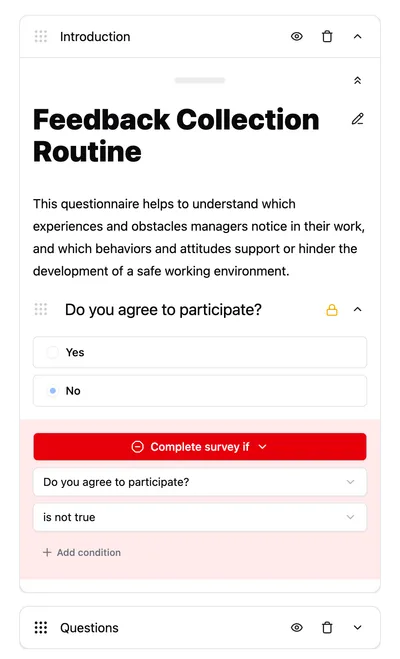
Add a consent question at the start of your survey. Make it a Yes/No question, defaulted to “No”. You can include terms of service or privacy information on the same page just before it.
After the consent question, add a conditional flow control that stops the survey if the answer is “No”. Users who decline will see the default end page.
This approach is best when you want a quick setup and don’t need to provide specific feedback to users who decline. The default end page is neutral and confirms that their session has ended.
Choose this method if:
- You need a quick and simple setup
- You don’t need to explain why the user was disqualified
- The standard “Thank you” page is sufficient for your needs
This works whether you put the consent question on its own page or at the top of your first page.
Method 2: Consent “trap” page
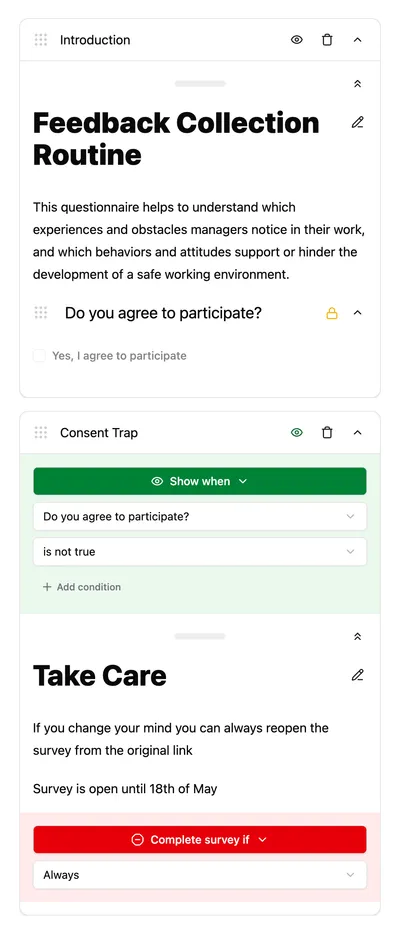
To show a custom message to users who decline, create a “trap page”:
- Put your consent question on page 1
- Create page 2 with your custom decline message
- Set page 2 to show only when consent is “No”
- Add an unconditional “Finish survey” flow control to page 2
Users who consent skip page 2 entirely. Users who decline see your custom message on page 2, then exit.
This pattern is often called a ‘screener’ or ‘logic trap’. It is ideal for professional research where you need to maintain a positive relationship even with disqualified participants. You can use the text on page 2 to explain why they were disqualified (e.g., “This survey is for residents of France only”) or offer them a link to a different study.
The key to this method is the unconditional stop on page 2. Without the ‘Finish survey’ control, the user would simply click ‘Next’ on your decline message and proceed to the rest of the survey, defeating the purpose of the consent check.
Choose this method if:
- You need to be polite or provide specific feedback
- You want to redirect disqualified users to another URL
- You are running a professional panel where participant experience is critical