How to create conditional success pages?
A survey is considered complete when there are no more questions left to answer.
In practice, this means:
- If your survey ends right after the last page of questions, respondents will see the system success page (the built-in “Answers recorded / Thank you” screen).
- If you add one or more pages after the last questions page, those pages become your custom success pages.
Important detail: a success page is a content-only page (for example: text, images, links). Once the survey is complete, the player hides navigation buttons on that screen.
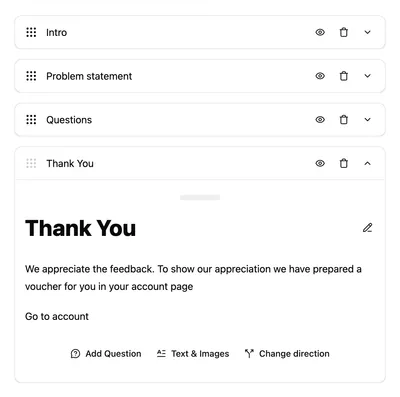
Create a simple success page
- Create your survey as usual (one or more pages with questions).
- Add a new page at the end of the survey.
- Add only content elements to that last page (commonly a text block), for example:
- “Thanks for your feedback!”
- What happens next
- A link or call to action
That last page is now your custom success page.
Create conditional success pages
You can create multiple possible success pages and show the “best” one based on earlier answers.
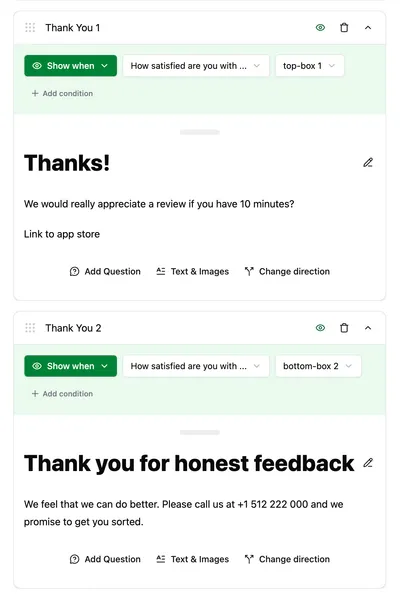
How it works
- You add several pages at the end of the survey.
- For each of those pages, you configure a page condition (“skip/show logic”).
- The survey player checks those conditions using the answers already collected.
- The first success page (in order) whose condition is met is the one the respondent will see.
Because navigation is hidden on success pages, respondents will only see one success page.
Example: Satisfaction-based endings
Imagine the first page asks respondents to rate their satisfaction (1-5 stars or similar). You can create three success pages with different messages.
Keep these pages content-only. If you want to ask a follow-up question, place it before the success pages.
- Highly satisfied → “Thanks! Want to leave us a review?” (with a link to appstore)
- Neutral → “Thanks. You’re done.”
- Dissatisfied → “Thanks. If you need help, contact support.” (with support info and phone number)
Place them in any order, but attach conditions so only one page matches for the respondent.
Quick checklist
- Put success pages after the last questions page
- Order matters: if two success pages would match, the first one wins.
- No navigation on success pages: once the survey is complete, the player hides Next/Back controls.
- No questions on success pages: success pages can contain only informational elements.
- No custom page? No problem: if all custom success pages are skipped (or you didn’t create any), the system will fall back to the system success page.