How to use QR codes for feedback?
Ask customers “How was everything?” in person and you’ll usually hear “Yeah, all good” - even when they couldn’t find what they wanted or thought the music was too loud.
The most useful feedback often comes after the moment, when there’s no pressure and no awkwardness. QR codes make that possible without email addresses or signup friction.
Why QR Codes Work
People scan, answer, and move on - no account creation, no personal details, no long URLs to type.
Because it’s quick and anonymous, feedback is usually more honest. Sometimes brutally so - but that’s the useful kind.
Keep Surveys Short
Someone scanning a QR code in your shop usually has about 30 seconds - maybe less.
Three questions is enough:
- A quick rating (stars or 1-5)
- One open question: “What could we do better?”
- An optional email field if they want a reply
Ask for opinions first. Ask for emails later, or not at all.
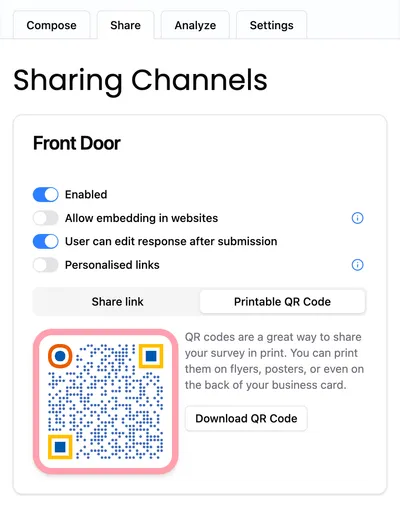
Create a Feedback QR Code
- Create your survey
- Open Sharing Channels
- Enable Printable QR Code
- Download and print
If you change the survey later, the QR code still works. No reprints needed.
Where to Place QR Codes
Not every wall is equal. These spots consistently get scans:
Waiting areas Checkout lines, coffee pickup areas, reception desks. People are already standing around.
At the exit When the experience is fresh. “Did you find everything you needed?” works well here.
In the shop window Effective even when you’re closed. Try “What would make you stop by?”
On tables or counters Cafés and restaurants - sometimes this even gives you a chance to fix problems before people leave.
Inside packaging Feels more personal than a follow-up email.
Always Give a Reason to Scan
A QR code alone is often overlooked. A short line next to it makes all the difference:
- “Help us improve - anonymously”
- “Too loud? Too slow? Tell us.”
- “Love it or hate it? We’re listening.”
People scan when they believe someone will actually read their answer.
Why Anonymous Works Better
When people feel identifiable, they soften their answers. Anonymous surveys remove that filter.
Once people feel safe, they’re more likely to leave their email voluntarily - especially after very good or very bad experiences.
Conclusion
If you don’t have a customer’s email address, you don’t have to guess what they’re thinking.
QR codes give people a simple way to be honest-right when the experience is still fresh. For many businesses, that is exactly where the most useful feedback comes from.
Ready to hear what your customers actually think? Create your first free survey and QR code here.