The survey editor now translates in place. Add a language, click Translate, and the entire survey is machine-translated: page titles, questions, answer options, and scale labels. Each language lives in a tab above the questions. Open one to read the survey exactly as respondents will see it, and adjust any wording you prefer to phrase differently. If the original text changes later, the editor tracks exactly which translations are affected.
You can still export the survey as JSON, translate it in bulk, and import it again. That remains the best route for external agencies and large surveys. But most edits are much smaller. When someone spots a clumsy sentence in the French version and just wants to fix that one line, they can now open the French tab and do exactly that.
Translate what is missing
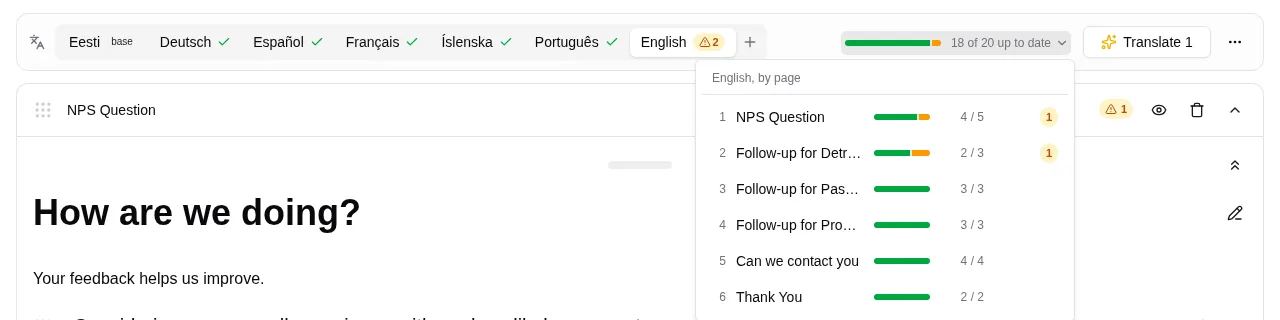
Each language tab shows how much work remains and whether that work requires a human or a machine. A page-by-page breakdown highlights exactly where the gaps are, letting you jump straight to them in a long survey instead of scrolling through every question.
The translation tool fills in whatever the open language is missing, but it never overwrites human-authored text unless explicitly requested. Every run also acts as a learning system: it uses your existing localized terms as a glossary, prioritizing human choices. If you settled on a specific word for “team” last month, a question added next week will automatically use that same word.
When the source text changes
Change a question in the base language, and every translation tied to it is instantly marked as out of date.
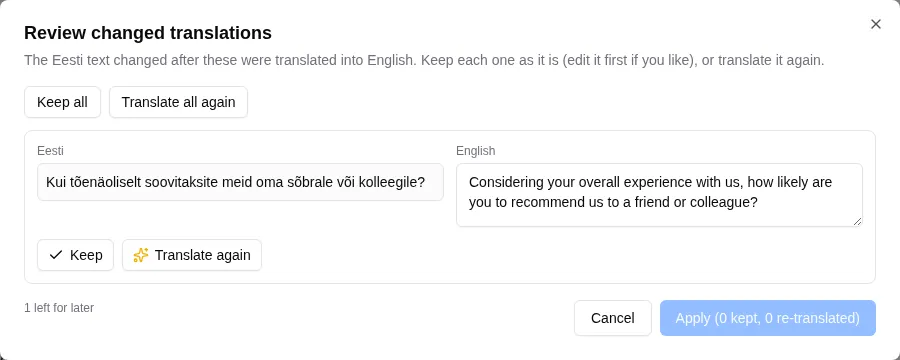
What happens next depends on who wrote the translation. A machine translation is simply refreshed on the next run. However, a human-authored translation is held for review to protect deliberate wording choices. The review interface places the current source beside your existing translation, letting you keep it, edit it, or translate it from scratch. Anything left undecided stays flagged, meaning a half-finished review is always safe to close and return to later.
One survey, one set of results
A translated survey is still a single survey. You no longer need to create separate French and German copies only to merge the spreadsheets afterward. A single link serves every language, and all answers flow into one unified dataset, allowing you to compare a French team’s responses with a German team’s without any manual stitching.